



A flange has six holes on Ø 80 mm. On the CNC machine or when marking out, you need the X and Y coordinate for each hole. With sine and cosine you can work them out in a few steps – as long as you have the start angle, direction of rotation and signs under control.
Pitch angle
If the holes are evenly spaced around the full circle, the full circle is divided by the number of holes:
- n number of holes
- Δφ pitch angle between two holes
- φ0 start angle of the first hole
- φi angle of hole number i
As is usual in CNC technology, angles are counted anticlockwise from the positive X axis.
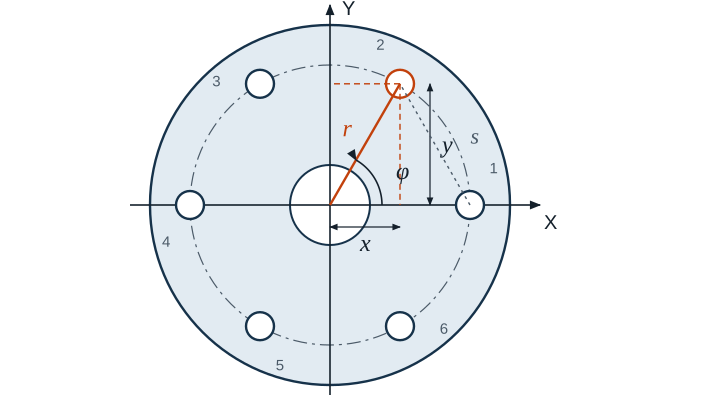
Coordinates of each hole
Here r is the radius of the bolt circle, i.e. half the bolt circle diameter. If the zero point is not at the centre but, for example, at a corner of the workpiece, add the coordinates of the centre.
Example
A bolt circle has 6 holes on Ø 80 mm, with the first at 0°. The radius is 40 mm and the pitch angle is 360° / 6 = 60°.
x2 = 40 mm · cos 60° = 20 mm y2 = 40 mm · sin 60° ≈ 34.641 mm
| Hole | Angle | X in mm | Y in mm |
|---|---|---|---|
| 1 | 0° | 40 | 0 |
| 2 | 60° | 20 | 34,641 |
| 3 | 120° | −20 | 34,641 |
| 4 | 180° | −40 | 0 |
| 5 | 240° | −20 | −34,641 |
| 6 | 300° | 20 | −34,641 |
The signs follow automatically from sine and cosine, as long as the calculator is set to degrees (DEG).
When the first hole is at the top
With five holes on Ø 100 mm, the first one is often at the top, i.e. at 90°. The pitch angle is 72°.
| Hole | Angle | X in mm | Y in mm |
|---|---|---|---|
| 1 | 90° | 0 | 50 |
| 2 | 162° | −47,553 | 15,451 |
| 3 | 234° | −29,389 | −40,451 |
| 4 | 306° | 29,389 | −40,451 |
| 5 | 378° = 18° | 47,553 | 15,451 |
Distance between two holes
To check with a vernier caliper, you need the straight-line distance between two adjacent holes, the chord:
For Ø 80 mm with 6 holes that is 80 mm · sin 30° = 40 mm, for Ø 100 mm with 5 holes 100 mm · sin 36° ≈ 58.779 mm.
On the CNC machine
Many controls have a bolt circle cycle. You enter the centre, radius, start angle, pitch angle and number of holes, and the control calculates the positions itself. Knowing the coordinates by hand is still worthwhile: for checking the simulation, for marking out and for machines without the cycle.
Common mistakes
- Diameter used instead of radius: all coordinates come out twice as large.
- Sine and cosine swapped: the X coordinate goes with cosine, the Y coordinate with sine, when counting from the X axis.
- Calculator in radians: cos 60 then gives −0.95 instead of 0.5.
- Start angle counted from the Y axis: the pattern is rotated by 90°.
- Centre forgotten: if the zero point is at the corner, the centre coordinates are missing from every hole.
- Partial circle calculated like a full circle: if the holes only lie on an arc, the specified angle applies, not 360° / n.