



Gesello is free. You can use the basic modules for tolerances, threads, cutting data and mathematics without an account and without ads. If you need more, Gesello Pro unlocks all specialist modules at once. Pay once, keep it for good.
Free
0 €
forever, no account
- 17 modules for everyday workshop tasks
- Fits, general tolerances, geometrical tolerances
- Threads, tightening torques, widths across flats, standard parts
- Cutting data, taper turning, surfaces, weights
- All CNC codes with sketches
- Mathematics, triangles, units, drawing symbols
- Sketch and calculation steps for every result
Gesello Pro
€14.99 launch price €9.99
one-time, no subscription, unlocked for good
- Everything in “Free”
- 17 more modules: Measuring & inspection, tolerance stacks, counterbores and clearance holes, welding, indexable inserts, cutting fluid, bolt circles and hole patterns, grinding wheels, production planning, materials, hardness conversion, heat treatment, bending, drives, hydraulics and pneumatics, control engineering
- CNC cycles with input form and a ready NC block to copy
- Scientific calculator on top of every page
Included in Gesello Pro at no extra cost
The calculator is already included
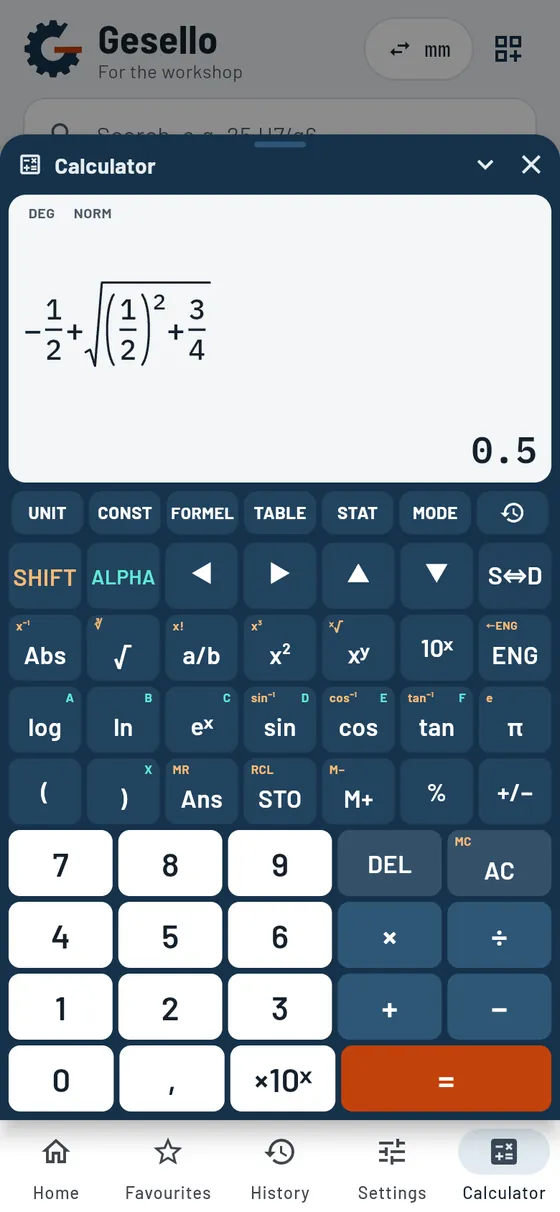
Scientific, with workshop formulas and true fractions. You open it on top of any module, calculate on the side and carry on where you left off.
- True fractions on the display
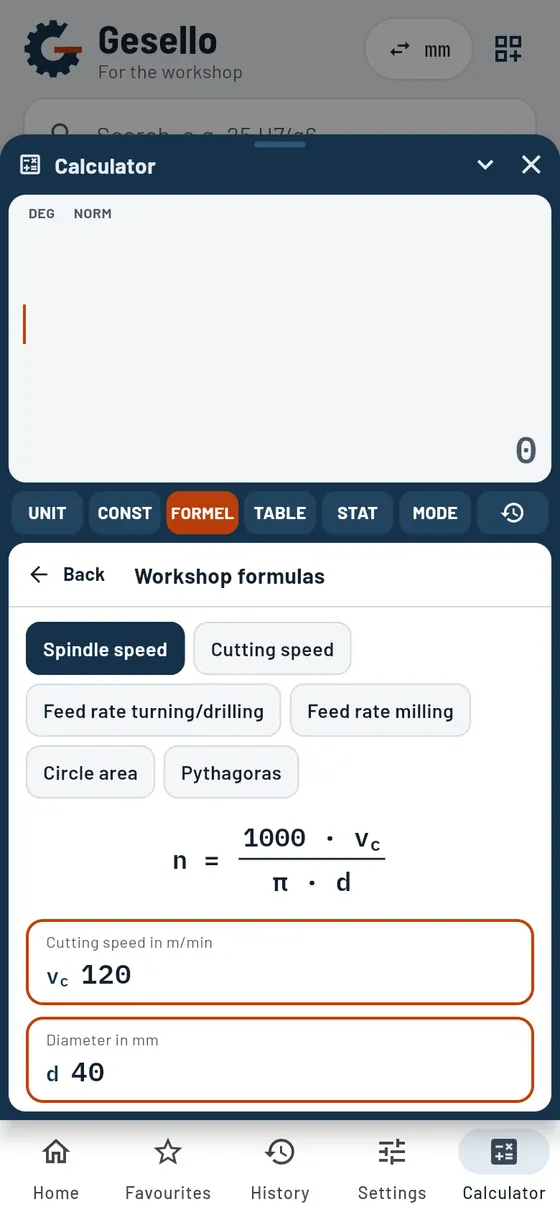
- Workshop formulas
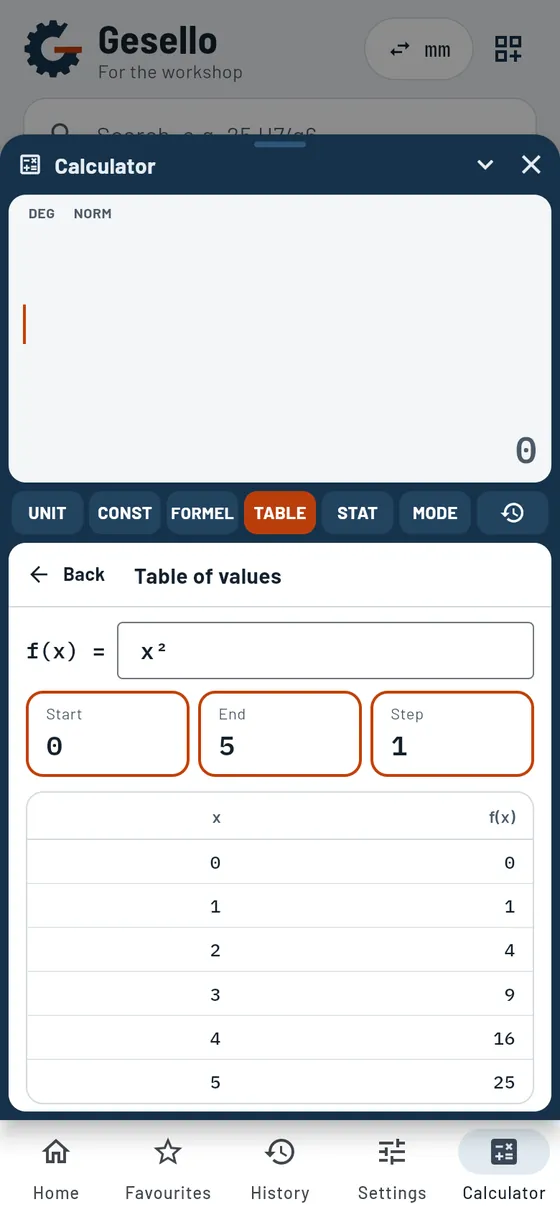
- Table of values
- Statistics
- Units and constants
- History
- Ready to hand on top of every module
What Gesello Pro includes
Every module with sketch, calculation steps and examples. Tap to open the detailed description.
- Measuring equipment at a glanceOver 20 measuring and inspection instruments with to-scale drawing, correct use and typical mistakes.
- Vernier caliper and micrometerScale with coinciding line, plus a practice mode with random exercises.
- Correct for temperatureWarm workpiece? Gesello converts back to 20 °C.
- Is the measuring instrument suitable?The golden rule with a clear verdict.
- Statistics with Cp and CpkPaste a measurement series, read off the trend and capability.
- Combining gauge blocksThe right gauge blocks for your target size.
- Enter linksDimension, deviations and direction, as many links as you need.
- Worst case and statisticalBoth methods compared.
- Unknown linkDistribute the tolerance to a part that is still open.
- Stack as a sketchArrows with plus and minus, closing dimension highlighted.
- Clearance holesFine, medium and coarse with tolerance.
- Cheese headCounterbore to suit a washer or spring washer, check the depth yourself.
- HexagonRoom for a socket or ring spanner.
- Countersunk head 90°Countersink diameter and depth with calculation steps.
- Fillet weldThroat thickness a and leg length z, weld volume and weld metal.
- StrengthStress in the weld and utilisation.
- HeatHeat input for MMA, MAG, TIG and SAW.
- Time and wireArc time, welding time and filler metal.
- Weld typesCross-section and symbol for seven weld forms.
- Decode an insertShape, clearance angle, size, thickness, corner radius, chip breaker.
- One dial per positionChoose the designation position by position on the dial, each with a short explanation.
- To-scale sketchTop view and section of the insert.
- ToolholderApproach angle, shank and the matching insert.
- MixingConcentrate and water for tank and concentration.
- CorrectingActual value in percent or from the refractometer.
- Topping upWhich mix brings the tank back to target.
- SelectionEmulsion, solution or oil, to suit process and material.
- Bolt circleFull or partial circle, start angle, direction of rotation.
- Workpiece zeroCorner or centre, dimensions directly on the sketch.
- CoordinatesCartesian or polar, ready to copy.
- NC blockBolt circle and hole row cycles, ready to paste.
- Hole rowAlso multi-row and angled.
- Decode designationShape, dimensions, abrasive, grit size, grade, structure, bond, speed.
- Maximum speedFrom diameter and peripheral speed, with a warning if the spindle is too fast.
- Check flangesSmallest flange diameter per wheel shape, with a sketch of the mounting.
- Mounting checklistRing test, blotters, wheel guard, test run, dressing.
- Grinding referenceProcesses with sketches, abrasives, bonds, grit selection.
- Process plan for a turned partFacing, centring, roughing, finishing, grooving and threading with cutting values and times.
- Process plan for a milled partFace milling, peripheral milling, pockets, slots, holes and threads, with setups and machining time.
- Process plan for a hole patternThreads, precision holes and countersinks in a clean sequence, with tap drill size and depth.
- Assembly and clamping devicesAssembly and disassembly sequence for assemblies, suitable clamping device per setup.
- Manufacturing costMaterial, labour, machine and surcharges per part and batch. Take machining time from the process plan.
- Your company profileSave rates, surcharges, tools and cutting values, on this device only.
- DecodeSteel, cast iron, aluminium, copper and old designations.
- Contents as barsCarbon and alloying elements at a glance.
- Alloying elementsWhat chromium, nickel or molybdenum do.
- MatrixElement and property in one table.
- Four scalesRockwell, Vickers, Brinell and tensile strength.
- Two material groupsAs delivered or quenched and tempered.
- Hardness ladderEquivalent values on one line.
- Steel name in, hardening temperature outCarbon content from the name, hardening temperature calculated from the diagram.
- Iron-carbon diagramTo scale, with coloured annealing ranges. Tap to see the microstructure.
- Processes at a glanceHardening, quenching and tempering, surface and case hardening, nitriding, annealing with temperature-time sketch.
- Quenching rules and safetyPractical rules and hazards in hardening, briefly explained.
- Temper and annealing coloursColour and temperature with typical tools.
- Fractions and functionsTrue fraction display, roots, powers, trigonometric functions.
- Workshop formulasSpindle speed, feed, circle area as a form.
- Statistics and table of valuesEvaluate measurement series, tabulate functions.
- History and memoryRecall earlier calculations.
- Blank and bend linesL, U, Z and hat sections, up to eight bends, with marking dimensions and minimum bend radius.
- Single bendBend deduction and correction factor for one bend.
- Round, tube, sectionDeveloped length along the centroidal axis, also for tube bends.
- RollingRing, cylinder, clamp and cone shell from sheet.
- DevelopmentOpen box with corner notches and tabs, tube cut at an angle.
- ShearingShearing force, cutting clearance and hand lever.
- Press brake bendingBending force, die opening and springback (guide values).
- ExplanationNeutral axis, bend deduction, rolling direction.
- Spur gearAll circles, pitch, centre distance, undercut warning.
- Determine moduleFrom the measured tip circle.
- Transmission ratioUp to three stages with speed and torque.
- Belt, chain, wormLength, wrap angle, number of links, self-locking.
- CylinderForce, pressure or piston diameter, when extending and retracting.
- Compressed airAir consumption per minute and per hour.
- PressPressing force and transmission ratio.
- SystemPump power and flow in the line.
- Valve builderChoose ports, positions and actuation, or type “5/2 solenoid spring”.
- Component cataloguePneumatics and hydraulics side by side.
- Tap-to-test logicTruth table, logic symbol, pneumatic and electrical implementation.
- SequenceDisplacement-step diagram and GRAFCET from the short form, with a warning for signal overlap.
- IdentificationDecode -KF1, 1.6, 13-14 or Ø100/70×200.
- ElectricalTiming relays with timing diagram, circuit diagram, terminal diagram, checklists.
The free CNC module shows you every command with an explanation. With Pro, you fill in each cycle in a form just like on the control: addresses in plain language, required fields marked, NC block ready to copy.
Free for everyone
The basics you need every day. No time limit, no ads.
- Real calculation
- Hole, shaft or fit
- Hole-basis and shaft-basis system
- Tolerance zones as a graphic
- Calculation steps you can follow
- New and older drawings
- Lengths, radii, chamfers, angles
- Geometrical tolerances without indication
- Overview table
- All symbols at a glance
- Tolerance zone as a sketch
- How it is inspected
- Calculate position deviation
- Six thread types
- Calculated from d and P
- Profile to scale
- Tap drill and manufacture
- Relief groove
- Tightening torque and preload
- Effect of lubrication
- Reading property classes
- Thread engagement length
- Blank for polygons
- Thread ↔ width across flats
- Parallel key
- What is being made?
- Retaining rings and washers
- O-ring
- Five processes
- Input in the sketch
- Theoretical roughness
- Machining time
- Learning path
- Command list
- Over 60 sketches
- Basics
- Standard tapers
- Swivel the top slide
- Sketch
- Tailstock offset
- Ra ↔ Rz
- Theoretical roughness
- Which process?
- Explanation
- Nine semi-finished product shapes
- Over 20 materials
- Sheet metal part
- Waste
- Quantity
- Sketch and calculation steps
- Areas and solids
- Circle and arc
- Electrical engineering
- Mechanics
- Heat
- Right-angled
- General
- Calculation steps with method
- 14 quantities
- All units
- Calculation steps
- Eight topics
- Three levels
- Series with evaluation
- Worked solution
- Six groups
- Detail sheet
- Common mistake
Good to know
Is it a subscription?
No. You pay once and keep Pro for good, including all future Pro extensions.
What happens when I get a new phone?
Pro applies to the store account you buy with. On the new device, tap “Restore purchases”.
Does a purchase on Android also work on iPhone?
No. Google Play and the App Store bill separately. A purchase only applies in the store where it was made.
Are there licences for classes or companies?
Yes. Write to us and tell us how many devices you need Pro for. Find out more under Schools and companies.